Effects
Laundrolay
Random space engine
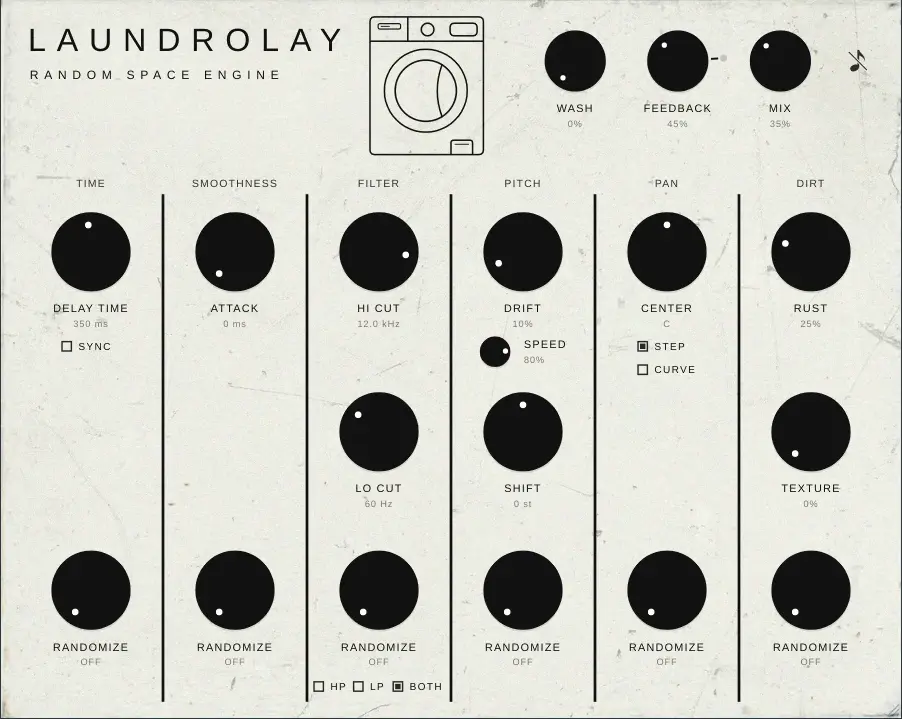
Have you ever wanted your delay to sound more organic, less predictable? I developed Laundrolay with that concept in mind.
Think about your usual workflow. You load your favourite delay and set the time: synced to the song's tempo when the groove needs it, or in milliseconds to paint a particular pattern of reflections, to experiment, or to catch strange in-between rhythms. If you're feeling adventurous, you widen it or switch to ping-pong to add depth to a lead or a drum bus. You filter the repeats if they need it. And that's it: everything is set in stone.
What if it could move instead? Maybe you write off-grid music, or you're building a drumless, washy bridge, and you want the echoes to breathe and surprise you, never letting your ear lock onto a pattern. Laundrolay is a tape-style, pitch-shifting delay built around that idea, and a few more.
Time
Every module, starting with the delay time, has its own Randomize knob. Set a delay time, and Randomize pushes each repeat a little early, then a little late, following a curve modelled on the lag and wobble of a tape motor. Values close in time stay related, so it sounds like a machine, not like a roll of dice.
In sync mode you can choose how Randomize behaves. Time works as above, drifting around the division you set. Division makes every repeat jump to a shorter subdivision of the one you set instead. The higher the Randomize, the further it reaches.
Attack
Attack is a stylish one. Every repeat can fade in with its own attack, softening the echoes into swells. Randomize it, and no two repeats bloom the same way.
Filters
Hi Cut and Lo Cut are always on. Set them where you like, then let Randomize move their cutoff frequencies away from where you put them, a different target for every repeat. The selector decides which filter gets randomized: the low cut, the high cut, or both. Every repeat sounds like the original, but different, and that adds liveliness to your tail.
Pitch
A nice pitch shifter that just sounds good: Shift moves the echoes up or down by up to an octave. Add Drift for tape-style pitch wobble, and set its speed anywhere from a slow, seasick wow to a nervous flutter. Randomize makes the depth of the drift wander over time.
Pan
Randomize moves each echo away from the position you set, along the same tape-drift curve, all the way to extreme, ping-pong-like swings. Choose Step to give every repeat its own fixed spot, or Curve to let the echoes roam freely across the stereo field. Speed sets how fast they move.
Dirt
Rust saturates the repeats, and Randomize decides how unevenly. Push it together with high feedback for jarring, saturated tails and swells of distorted material. Texture adds random dropouts and mixes in the unmistakable hum of a washing machine.
Feedback, Mix and Kill
At the top, Mix blends dry and wet, and Feedback decides how long the tail stays alive. Crank the feedback or the input and the tail picks up saturation, like a real tape delay. Around 100% the loop sustains itself; push on to 125%, add Rust, and watch the tail degrade into a noisy drone. Don't worry: a gentle limiter lets it distort but never lets it get too loud. When you want to start over, hit Kill (the crossed-out note) and the loop empties in half a second.
Wash
Curious about Wash? I saved it for last. Wash does what it says: it soaks your echoes in a diffuse reverb with a cool phasing effect swirling inside, as if your sound were going round in a washing machine. It steps back while you play and swells when you stop.
Download
Laundrolay is free.
Use it in any production, commercial ones included. Everything you make with it is yours.
By downloading and installing you accept the License Agreement. How data is handled: Privacy Policy.
- Version
- 1.0.0
- Format
- Windows 10/11 (64-bit) · VST3®
- Price
- Free
- Online
- Never. No activation, no telemetry.
- Download and unzip the file.
- Run the installer and accept the licence, or copy the
.vst3folder toC:\Program Files\Common Files\VST3. - Rescan plugins in your DAW.